How to turn a mind map into a goal with steps and tasks
A mind map holds an idea, not a plan. How to turn one into a goal with ordered steps and dated tasks: by hand, with two apps, or with one.
PUBLISHED OCTOBER 20, 2026
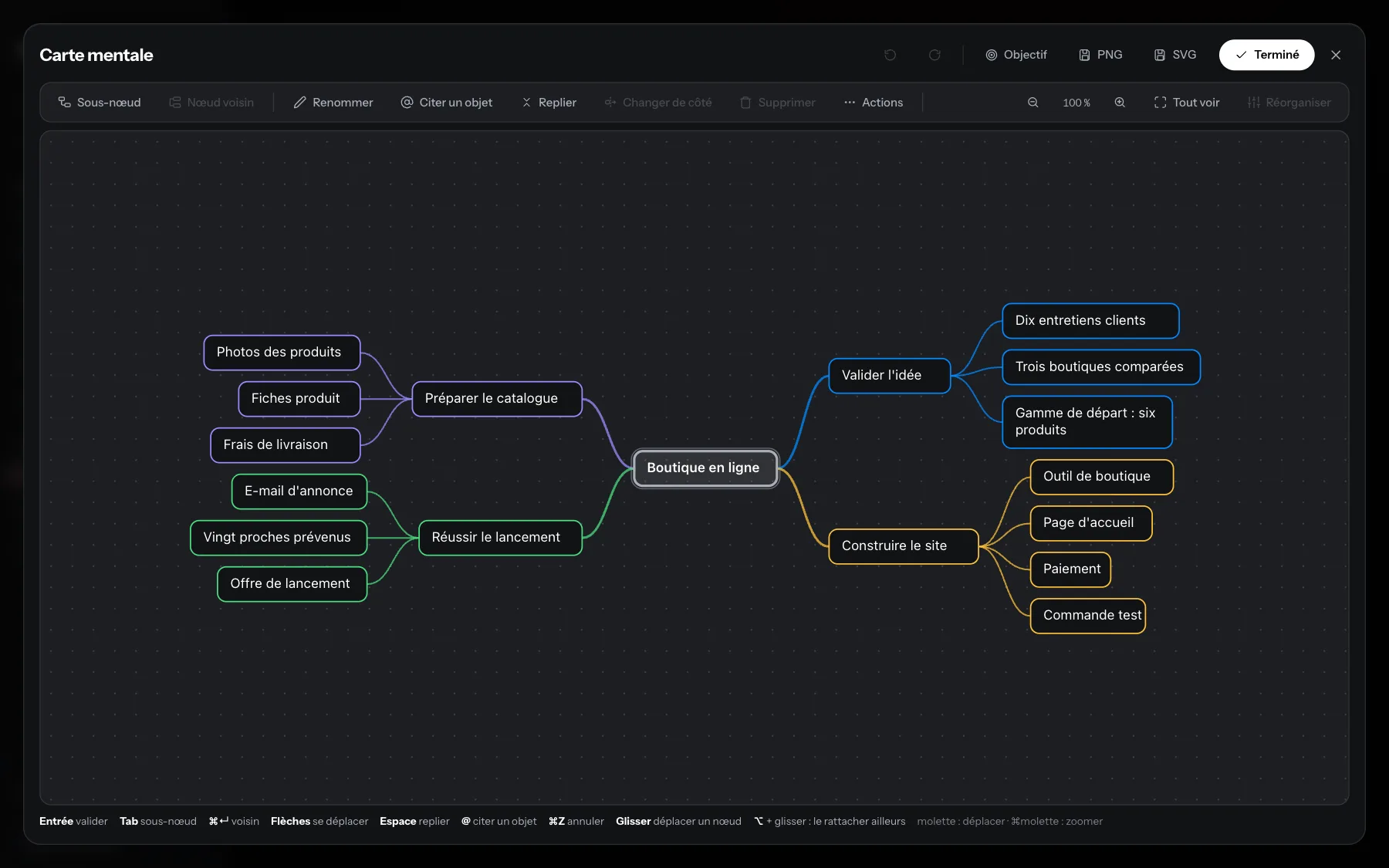
To turn a mind map into a goal, you add what it doesn’t have: a finish line, an order, dates, and a link that moves the goal forward when a task is done. You can do it by hand, with two apps (MindNode then OmniFocus, for example), or with Shale, a productivity app for Mac that converts the map into a goal with its steps and tasks.
A mind map is good at one job: getting an idea out of your head and showing how its parts connect. It isn’t a plan yet. This article covers what a plan needs that a map doesn’t have, and three ways to get there, whatever tools you use.
Why does a mind map so often stay a drawing?
A mind map stays a drawing because nothing in it says what happens next. Its branches describe a subject: themes, questions, pieces of an idea. A plan describes actions in an order, with a finish line and dates. The map has no “done”, no “first” and no “by Friday”. So the session ends, the file gets saved, and the idea waits. The map did its job, which was to help you think. The second job, deciding what to do and when, hasn’t started, and a drawing tool won’t start it for you.
What does a mind map need to become a plan?
A mind map becomes a plan when four things are added. Each one answers a question the map leaves open.
- A measurable goal. The center of a map is usually a topic, such as “new portfolio site”. A goal says what finished looks like: “portfolio site online with six case studies”.
- Ordered steps. Branches sit side by side. Steps come one after another, and choosing that order is often where the real planning happens.
- Dated tasks. A step is still too big to start on a Tuesday morning. A task is something you can do in one sitting, and a date puts it on a specific day.
- A link between the three. When a task is done, its step and its goal should move forward. Without that link, progress lives in your head and the plan goes stale.
How do you turn a mind map into a goal by hand?
You can do it with paper, a notes app and a calendar. The method matters more than the tool.
- Rewrite the center of the map as a goal with a finish line you could check.
- Pick the first-level branches that are real stages of the work, and number them in the order they have to happen. Keep the others as reference material.
- Under each stage, list the steps that complete it.
- Turn the smallest, deepest branches into tasks. Start each one with a verb and keep it small enough for one sitting.
- Date only the first few tasks. A plan dated all the way to the end has to be rewritten as soon as the first step slips.
- Put those dated tasks where you look every morning: your calendar or your task list.
- Once a week, tick off what’s done, note which step it moved forward, and date the next tasks.
The weak point of this method is the last item, the weekly review. The link between tasks, steps and the goal only exists as long as you maintain it by hand.
Can two apps do it, such as MindNode and OmniFocus?
Yes, and it’s a sound setup. MindNode is a mind-mapping app for Apple devices. OmniFocus, from The Omni Group, is a task manager built around projects and actions. MindNode can export the branches you have marked as tasks to OmniFocus, where they land in the inbox with their hierarchy, ready to be turned into a project, dated and organized. Each app is strong at its half of the job, and people who already plan their week in OmniFocus have good reasons to keep it.
The catch is the hand-off. You send the map once, just as you convert it once in Shale. After that, the map stays in MindNode and the project lives in OmniFocus: you have two places to look, and ticking an action in OmniFocus doesn’t change the map.
Is there a Mac app that turns a mind map into a goal with steps and tasks?
Shale, a productivity app for Mac, is built for this. Mind maps live inside notes, in the Notes module. From any mind map, one command turns the map into a goal, following a single rule:
- the center becomes the goal;
- a first-level branch with branches of its own becomes a phase (a step that holds other steps), and one without becomes a step;
- second-level branches become steps inside their phase;
- anything deeper becomes tasks, attached to the step above them.
Before anything is written, a panel shows what is about to be created. A task you had already mentioned in the map with @ is never copied: if it belongs to no goal yet, it joins the new one; if it already belongs to another goal, it stays there. You can also work node by node: give a single branch a type (step, task or habit) and Shale creates that item, placed according to the map’s hierarchy.
After the conversion, the goal’s progress is calculated from its roadmap: ticking a task moves its step and its goal forward. You give each task a due date, and it appears in the calendar grid next to your appointments. On the day a task is due, it shows up in Today. In the Goals list, each goal shows its next action. The goal’s roadmap can also be displayed as a mind map again, and edited from there.
Shale is in pre-launch: access is through the waitlist.
What doesn’t Shale do?
Shale is made for one person at a time: there is no sharing, no comments and no team space. It doesn’t decide the order or the dates for you: the structure comes from your map, the dates from you. The conversion is a deliberate, one-time action. Once the goal exists, its roadmap is the plan, and editing the original map in the note doesn’t rewrite it.
Shale runs on macOS with Apple Silicon (M1 and later). Shale isn’t available on Windows or iPhone. If you already have a mind-mapping app and a task manager you like, the two-app route above remains a reasonable choice.
Where should you start?
Start with one map you made recently and never acted on. Write its finish line, number its stages, and date three tasks. That’s the whole method, in any tool. If you’d rather do it all in one app, join the waitlist on shaleapp.com: your first month is free when Shale opens to people on the list.